GoWarm Work · Daily work

Daily work tracking that is one line, not a timesheet.

Half your company does work that appears in no deal, no ticket and no dashboard. Right now the only way to find out what they did is to ask them. GoWarm Work makes that record build itself — one short line a day, written by the person doing the work, read wherever it is needed.

What is daily work tracking?

Daily work tracking is a short written record of what a person did on a piece of work, made by that person on the day. It is not a timesheet and not an activity monitor — there are no timers, screenshots or idle detection. In GoWarm Work it is one line, chosen from a controlled activity list, stored once and read on the person's own day, against the project task, and in their manager's rollup. Compliance is days logged divided by working days.

You already have daily work tracking. It is a shared spreadsheet.

Almost every company under 500 people has one. A tab per person or a tab per month, filled in on Friday from memory, read by nobody, and quietly abandoned within two quarters.

It fails for three reasons, and they are worth naming separately because they need different fixes.

It is a separate job. Opening a sheet and describing your week is work about work, so it competes with the work and loses. The version that survives is one where writing the line is part of doing the task, not an errand afterwards.

Nothing is comparable. One person writes "client call", another writes "Call with client", a third writes "customer discussion". Three spellings of one activity become three lines in any summary, so the sheet can be read but never counted.

Nobody can tell absence from silence. A blank cell might mean a quiet day, a holiday, or that the person stopped filling it in six weeks ago. Without a working calendar underneath, the sheet cannot distinguish the three, so it cannot support a single reliable statement about anything.

The point is not that people are undisciplined. It is that the sheet asks for a second job and gives nothing back to the person doing it.
Say it once. Three people get their answer.

The line a person writes against a project task is their daily work entry. Not a copy of it, not a synchronised version — the same stored row.

One entry, three places A person writes a single line of work once. That one stored entry is read by their own day view, by the task on the project, and by their manager's rollup. No copies are made and nothing is synchronised. WRITTEN ONCE READ IN THREE PLACES The person doing the work ONE ENTRY · ONE ROW “Cast the second slab. 3 of 5 bays done, rebar for bay 4 arrives Thursday.” Their own day what I did today The task on the project where the work stands The manager's rollup who is on what Stored in exactly one place. No copy, nothing to keep in step.

Two stored copies would need synchronising, and the first time two screens disagree, both stop being believed. One row removes the possibility.

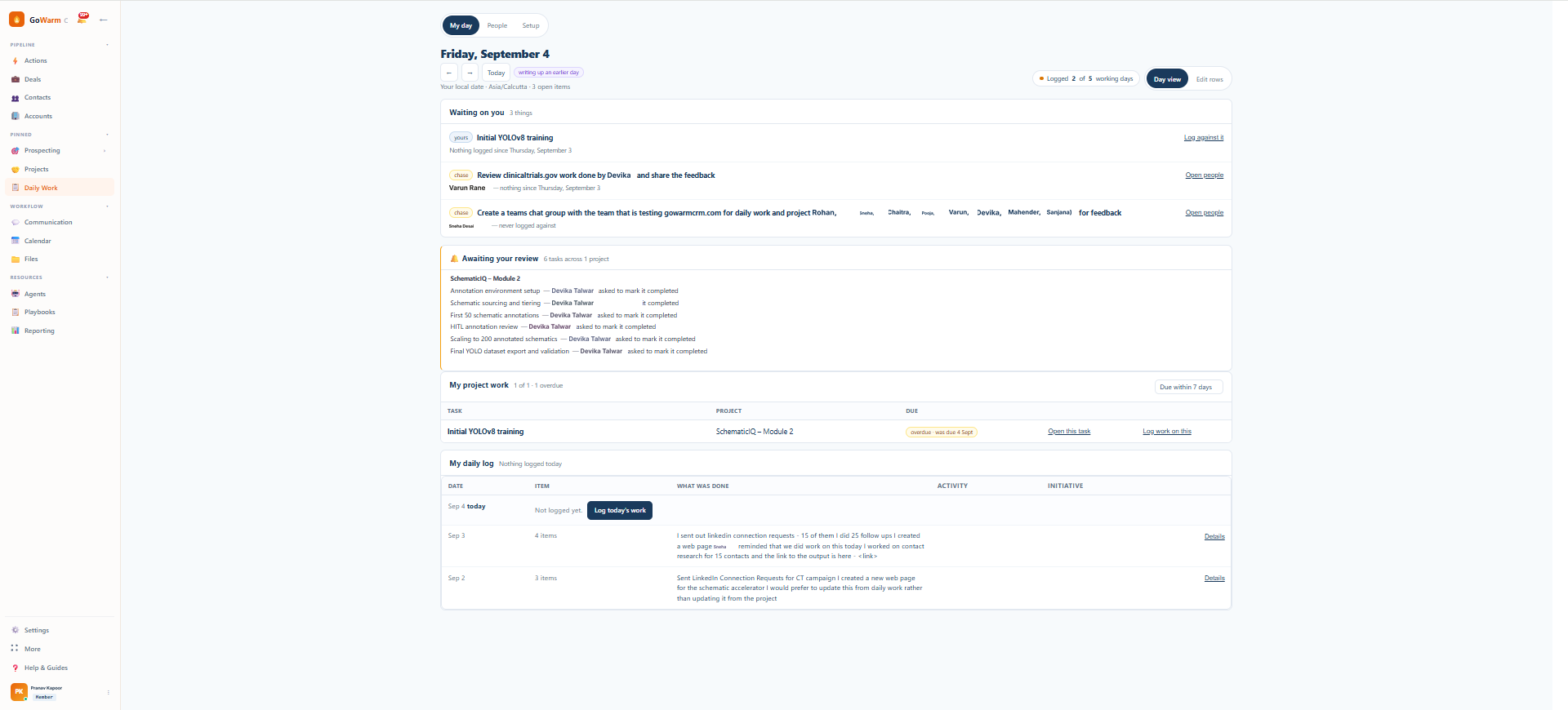
My day in GoWarm Work: everything one person is carrying, with a box against each item for what they did today
My dayEverything one person is carrying, with a box against each for what they did today. Two minutes at the end of the day, and no other form to fill anywhere.

Nothing generates an entry, so there is nothing to fall behind on.

No scheduler creates a daily row for anyone. A day with no entry is an absence, not an unfinished item sitting in a queue. That single decision is what keeps the system readable in month six.

A generated queue against a written record On the left, a queue of automatically generated items climbs from 389 to 541 to 583 and then sits flat, past the point at which anyone reads it. On the right, entries written by people appear on the days work happened, and days nobody worked on it stay blank. A SYSTEM THAT GENERATES WORK past the point it is read 389 541 583 19 days, flat Every reminder in that period: unopened. A RECORD ONLY PEOPLE WRITE nobody worked on it A blank day stays blank. There is no backlog.

Generated items arrive on a schedule; attention does not. The only queue that cannot outrun its reader is one nothing adds to automatically.

Compliance is therefore a straightforward number: days logged divided by working days in the window, with the denominator taken from each person's schedule and your holiday calendar. It compares properly between someone on a five-day week and someone on six, it does not inflate over time, and it cannot be gamed by a system quietly adding rows.

A controlled list, with an escape hatch that never blocks anyone.

The tension in every logging system: a fixed list is countable but frustrating, and free text is easy but useless in aggregate. The resolution is to allow both and curate the boundary.

People pick from a list

Activity types are defined for your organisation, so what appears in a rollup is countable. Training, site work, client call, review, whatever your business actually does.

"Other" is always available

When the list does not have what someone needs, they type it and carry on. Nobody is ever blocked from logging because the vocabulary was incomplete, which is the failure that kills adoption in the first month.

The manager curates what accumulates

Everything entered as Other lands in a queue. The manager promotes the ones that turn out to matter into the real list, and merges the near-duplicates into existing entries. The vocabulary grows out of what people actually do rather than what somebody guessed in week one.

What the manager gets, without asking anyone.

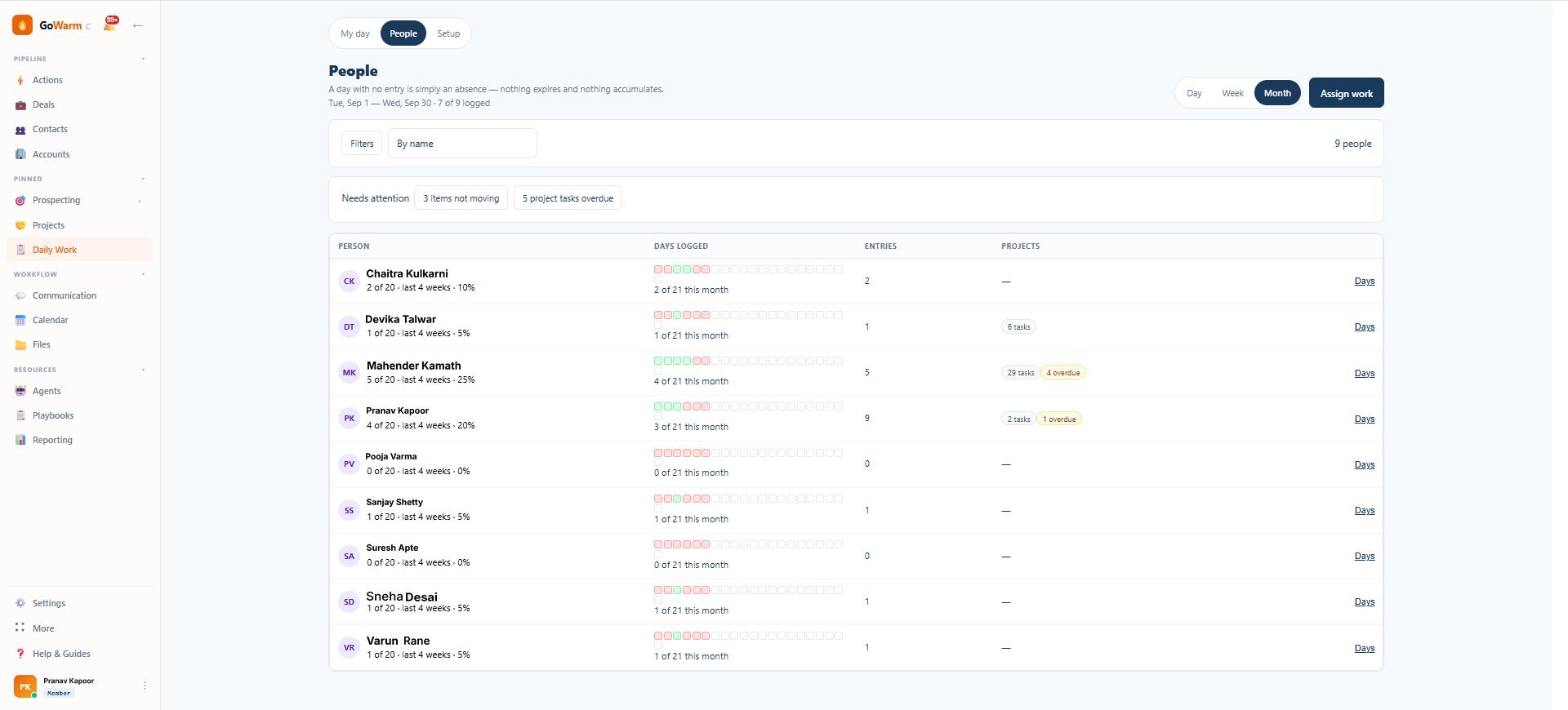
Each person's logging record sits beside their open and overdue project tasks, so the two questions a manager actually has — is this person's work visible, and is it on time — are answered on one screen. Expand anyone and every line they wrote is there, against the task and the project it belongs to.

The People screen in GoWarm Work: each team member's days logged, entries and project tasks side by side
PeopleDays logged against working days, entries, and open or overdue project tasks, per person. The answer to "what has this team been doing" without a status meeting.

This is not monitoring, and it is built not to be.

There is no timer, no screenshot capture, no idle detection, no keystroke logging and no productivity score anywhere in the product. Not as a setting that is off by default — the capability does not exist.

The measure a manager sees is whether work was recorded on a working day, and what it was. Nothing about how someone spent their hours. That is a deliberately low bar, and it is the only one that survives contact with a busy team, because a record people are afraid of is a record nobody writes honestly.

Questions we get asked

Is this a timesheet?

No. A timesheet asks where the hours went and gets filled in on Friday from memory. This asks what happened, in one line, on the day. There is no hour counting anywhere in the product.

Will people actually do it?

One line, written where they already are, from a list, with an escape hatch that never blocks them, and no backlog if they miss a day. Habits need a low floor.

What about people who are not on projects?

Recurring work that never completes is a first-class item, so someone whose job is maintenance, support or compliance logs against that rather than being forced into a fake project.

Can someone log a day they missed?

Yes, within a backfill window your organisation sets. Beyond it the day stays blank, which is the honest answer and keeps the compliance number meaningful.

Does the manager see it in real time?

Entries appear as they are written. There is no nightly batch and no report to run.

What does it cost?

$999/month for up to 25 users, custom above that, priced by organisation rather than per seat. Projects and daily work are included together — this is not a separate module you buy on top. Running GoWarm CRM as well? Both products together are $1,499/month for up to 25 users. See pricing.

Pick the team you can see least of.

Twenty minutes. We set up one department with its schedule, its holiday calendar and a first activity list, and you watch what a week of it actually looks like.

Book a walkthrough Free · 20 min · No obligation